
Mixes that fix their
own clashes
Mixdis is a desktop mix builder for DJs. Drop in your tracks and it splits each one into drums, bass, melody and vocals, beat-matches them without changing their key, and blends the stems so the vocals, bass and melodies of two tracks never fight — then lets you play it like a mixer, with filters, echoes, rolls and risers on any stem — or cut whole songs apart and rebuild them as a mashup. Everything runs on your own machine.
A blend is only as good as what overlaps
Two tracks can be perfectly beat-matched and still sound wrong, because the wrong parts are playing together.
A normal crossfade mixes two whole tracks. If both have a lead vocal, or both have a heavy bassline, or the keys don't agree, the overlap turns to mud — and you can't fix it without touching the whole track.
Mixdis separates every track into four stems — drums, bass, melody and vocals — then automates each stem across the transition. It finds where the tracks clash, ducks only the stems that clash, and shows you every fade on the timeline so you can drag any of it. Tracks are matched in tempo with pitch-preserving time-stretch, so each one keeps its own key.
Try it: one transition, four stems
Cut it up. Rebuild it.
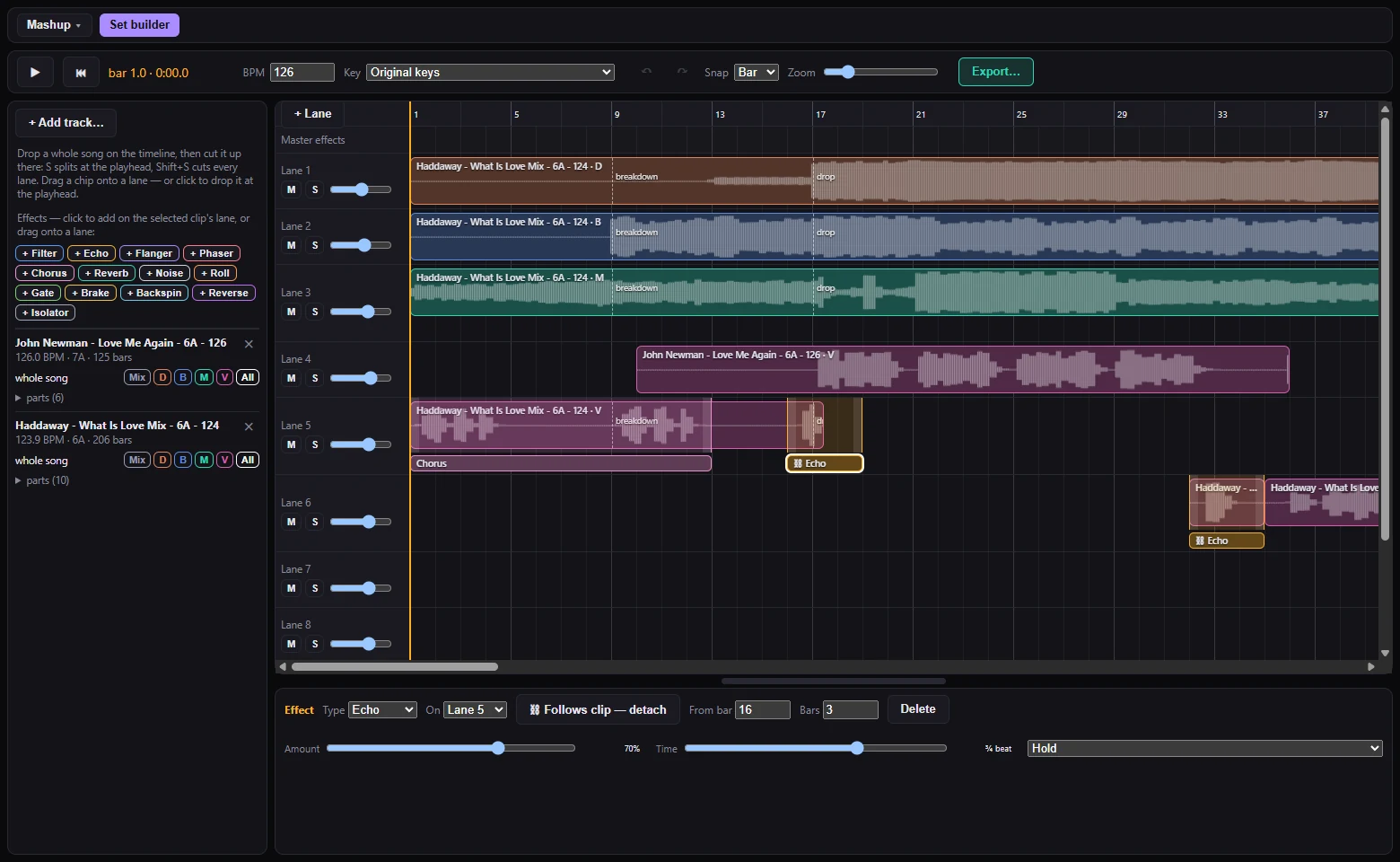
One click turns the set builder into a multi-lane timeline. Drop whole songs on it, chop them at any bar and layer the stems of different tracks — locked to one tempo, with the same effects rack.
Chop songs anywhere
Drop a whole track, press S to split at the playhead or Shift+S to cut every lane, then drag the pieces around. It all snaps to the bar or beat — hold Alt to place freely.
Stems on their own lanes
Put the drums of one song under the vocals of another. One click drops all four stems on four lanes that move, trim and cut together.
One tempo, optional key match
Every clip is stretched bar by bar onto the project tempo with its pitch kept. Match keys across the whole mashup, or shift a single clip by semitones.
Edit while it plays
Cuts, moves and trims are heard straight away — scrub the ruler and rearrange without the music stopping to re-render.
Effects that follow the clip
Put a filter, echo or reverb on a clip and it moves, cuts and duplicates with it. Drag one onto a lane and a preview shows where it will land.
Export the finished mashup
Render clips and effects to MP3, FLAC or WAV, and save the project to reopen later — the last five are one click away in the menu.
Play it like a mixer
Thirteen mixer-style effects you can drop anywhere on a track, for any length — on the whole track or on a single stem.
Filter & noise sweeps
Low-pass to high-pass with a start and an end value, or a turning point for an up-and-back sweep. A noise riser that builds into the drop.
Echo, reverb, roll
Beat-synced echoes that ring out after the track ends, a reverb tail, and beat-repeat rolls from half a beat down to a sixteenth.
On any stem
Echo out just the vocals while the drums keep going. Every effect can target drums, bass, melody, vocals or the whole track.
Brake, backspin, reverse
Vinyl-style brakes and backspins that last exactly as long as you set, and a reverse for a bar or two into a drop.
Everything in one timeline
Plan a set, hear it live, and fix it by hand where you disagree.
Three tools, one DJ workflow
Prepare the library, build the mix, light the set.
BeatDis
Get the grid right. Drift-following beatgrids written straight into Serato and Rekordbox, so your library stays in time all the way through a track.
Visit BeatDis →Mixdis You are here
Plan and play the mix. Stem-aware transitions, tempo ramps and a mixer-style effects rack, all running on your own machine.
Trippin Free
Light the room. Live music-reactive visuals for DJ sets. It picks up whatever your computer is playing — Mixdis included — so it works alongside any DJ software.
Get Trippin →